About Maxthon browser
Do you want to save mobile data and save money on your monthly bill? Try Maxthon Cloud Browser! You can save all kinds of stuff and read them offline in your browser at any time. Smart image display could also help you...
Do you want to save mobile data and save money on your monthly bill? Try Maxthon Cloud Browser! You can save all kinds of stuff and read them offline in your browser at any time. Smart image display could also help you control mobile data consumption effectively. This browser is made just for mobile.
As the the 6th generation web browser developed by Maxthon USA Inc., which was once awarded "Best Browser" on About.com For 3 Consecutive Years, Maxthon Cloud Browser is created for those who spend much time on the web every day, especially for iOS users because of its iDevice features like Touch ID, 3D Touch…
It’s time to switch to this faster and lighter browser to improve the efficiency and save data now!
FEATURES:
*BUILT-IN NOTE-TAKING TOOL- You can make notes easily while browsing the web. Collect and save any content you see on the web with one tap. Read, edit and organise your collection even offline.
*BUILT-IN PASSWORD MANAGER- It handles passwords for your, securely saves them and automatically fills them in next time you visit the site. Employing multiple encryption technologies, your passwords will never be safer.
*NIGHT MODE- Are you a night owl? It’s time to say time to sore eyes. Read more comfortably in the dark with Maxthon now.
*INCOGNITO MODE- Turn on Incognito mode in Maxthon and browse the mobile web without a trace.
*SYNC ACROSS DEVICES- Access tabs, bookmarks & history from other devices, Pick up where you left off on your other devices and read offline.
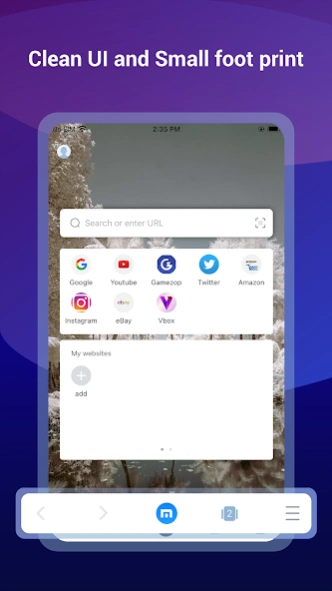
*CUSTOMISABLE SPEED DIAL- Add your favourite websites, apps or even search result to speed dial, to visit them on the go with one touch.
*SMART IMAGE DISPLAY- Help you control your mobile data usage and save money for you.
*EASY MULTI TABS MANAGEMENTS- You can open as many tabs as you like, and switch or close with only one touch.
Millions of people use Maxthon browsers to watch videos, connect with friends, search on the web, and sync data across platforms. We hope Maxthon Cloud Browser could help more and more people enjoy the Internet, while saving more data and money.
Download Maxthon Cloud Browser and save your mobile data from now on!
Previous Versions
Here you can find the changelog of Maxthon browser since it was posted on our website on 2015-04-26 03:00:00.
The latest version is 7.5.7.107 and it was updated on 2026-10-11 02:51:38. See below the changes in each version.
Maxthon browser version 7.5.7.107
Updated At: 2026-09-28
Maxthon browser version 7.5.6.105
Updated At: 2026-09-14
Changes: + Read mode: add text-to-speech, media center controls
+ Bottom address bar: add refresh & read mode buttons
+ New note filter: view notes/URLs separately
- Fixed QR code right-click recognition issue
- Fixed sync error on note reordering
- Downloads no longer require notification permissions by default
Maxthon browser version 7.5.5.109
Updated At: 2026-08-21
Changes: + Added userscript feature, supporting script management
+ Added userscript import via URL and installation from GreasyFork
* Improved compatibility with newer Android system versions
* Optimized userscript injection, update and network request capabilities
* Optimized installation package resources and release build configurations
‑ Fixed a bug that might cause note data mixing after account switching
‑ Fixed abnormal user‑information display on the Settings page
Maxthon browser version 7.5.4.106
Updated At: 2026-08-03
Changes: + Support for bottom address bar
+ Video functions: download, pop-up playback, playback speed adjustment, screen casting, etc.
- Fixed sign-in issues
- Fixed timeout errors when saving web pages to notes
- Fixed sync issues for My Sites
Maxthon browser version 7.5.1.120
Updated At: 2026-06-29
Changes: - Support NoteV2 API for notes; optimize loading & refresh logic.
- Fix recent notes rendering, sync refresh and cold start issues.
- Correct folder display and favorites/folder count errors.
- Resolve note save refresh bugs and address-saving crashes.
- Fix web tab order & selected tab restore failures.
- Eliminate webpage gesture conflicts.
- Optimize in-page search UI and autofill compatibility.
- Fix download notification and stability problems.
- Fix occasional launch lag.
Maxthon browser version 7.5.2.101
Updated At: 2026-06-29
Changes: - Optimize the overall interactive process of login
- Fix the issue where background configuration memory fails in reading mode
Maxthon browser version 7.5.0.123
Updated At: 2026-06-04
Changes: Fix startup screen freeze under certain scenarios
Maxthon browser version 7.5.0.122
Updated At: 2026-05-22
Changes: - Optimize page loading and retention without manual activation
- Fix blank screen and display errors for smoother browsing
- Improve display of notes and bookmarks folders for easier search
- Solve weather blank display issue and optimize installation prompts
- Refine homepage design and enhance overall running stability
Maxthon browser version 7.4.8.107
Updated At: 2025-12-16
Changes: + Added FCM message notification support
+ Added note-editing page save feature
+ Added weather detail popup on Home screen
* Improved folder selection list expansion behavior
* Improved wording: changed “Recent Notes” to “Recently Modified”
* Improved experience when changing note and bookmark directories
* Improved keyboard interactions on the note-editing page to prevent content from being blocked
- Fixed an issue where bookmarks saved into subfolders did not appear in Recent Bookmarks
Maxthon browser version 7.4.6.103
Updated At: 2025-10-27
Changes: 1. Fixed an issue where downloads might fail
2. Added download notification prompts
3. Fixed the issue where the bottom notification bar could block content
4. Changed the default download path to the system’s Downloads folder
5. Fixed other potential issues (mainly those reported on Google Play, such as NPE, Service-related problems, etc.)
Disclaimer
External Download
We do not host Maxthon browser on our servers. We did not scan it for viruses, adware, spyware or other type of malware. This app is hosted by Galad and passed their terms and conditions to be listed there. We recommend caution when installing it.
The APK Download link for Maxthon browser is provided to you by apps112.com without any warranties, representations or guarantees of any kind, so access it at your own risk.
If you have questions regarding this particular app contact the publisher directly. For questions about the functionalities of apps112.com contact us.